
250x250
Notice
Recent Posts
Recent Comments
Link
| 일 | 월 | 화 | 수 | 목 | 금 | 토 |
|---|---|---|---|---|---|---|
| 1 | ||||||
| 2 | 3 | 4 | 5 | 6 | 7 | 8 |
| 9 | 10 | 11 | 12 | 13 | 14 | 15 |
| 16 | 17 | 18 | 19 | 20 | 21 | 22 |
| 23 | 24 | 25 | 26 | 27 | 28 | 29 |
| 30 | 31 |
Tags
- jupyternotebook
- 교차검증
- Memory
- psycopg2
- pgadmin
- docker
- Linux
- postgre
- TensorFlow
- 연결
- Docker image
- psql
- GridSearchCV
- LOG
- 도커이미지
- GPU
- 파이썬
- Python
- 쿼리
- sqldeveloper
- SQL
- 시계열
- 오라클
- 리눅스
- 머신러닝
- 복구
- Jupyter
- 도커
- cpu
- oracle
Archives
- Today
- Total
areum
[Python] 파이썬에서 오라클 연결하는 방법 본문
728x90
1. Oracle 홈페이지에서 instant client 다운로드하기
2. cmd 창에서 cx_oracle install 하기
3. 주피터 노트북에서 cx_oracle import 하여 연결하기
* 주피터 노트북에서 바로 오라클을 연결하여 데이터를 추출하고 싶어 아래 방법을 사용하였습니다.
1. Oracle 홈페이지에서 instant client 다운로드하기
저는 Windows 환경이라 아래 노란색 체크되어 있는 것으로 다운로드하였어요!
본인 환경에 맞는 instant client 설치하시면 될 거 같아요.

https://www.oracle.com/database/technologies/instant-client/downloads.html
Oracle Instant Client Downloads
We’re sorry. We could not find a match for your search. We suggest you try the following to help find what you’re looking for: Check the spelling of your keyword search. Use synonyms for the keyword you typed, for example, try "application" instead of
www.oracle.com
2. cmd 창에서 cx_oracle install 하기
pip install cx_oracle

procees ([y]/n) ? y입력
3. 주피터 노트북에서 cx_oracle import 하여 연결하기
- location에 위에서 설치한 instant client 위치를 적어주면 됩니다.
import cx_Oracle
import os

location = r"D:\Users\instantclient-basic-windows.x64-21.6.0.0.0dbru\instantclient_21_6"

os.environ["PATH"]=location + ";" + os.environ["PATH"]

OracleConnect = cx_Oracle.connect("접속이름"/"비밀번호"/"ip호스트이름:포트번호/SID이름")


# 데이터 프레임으로 변환.
df = pd.read_sql("""select문""", OracleConnect)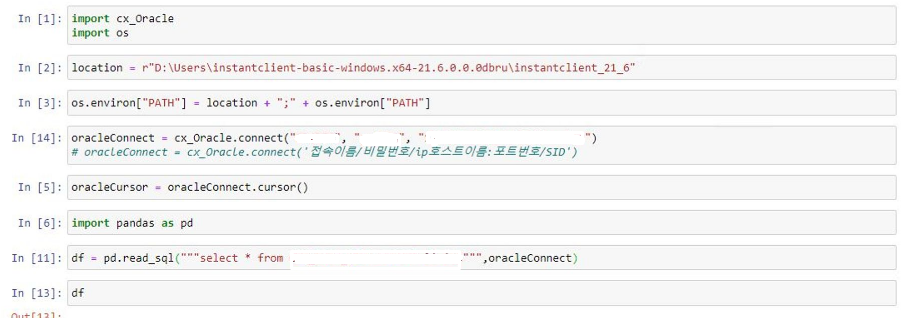
'Programming > Python' 카테고리의 다른 글
| [Python] datetime 활용하기 (0) | 2023.04.12 |
|---|---|
| [Python] psycopg2 설치하는 방법 (1) | 2023.01.11 |
| [Python] 파이썬 포스트그레 연결하는 방법 (2) | 2023.01.11 |
| [Python] 데이터프레임 컬럼명/값 이름 변경 (0) | 2022.11.28 |
| [Python] zip파일 압축 및 풀기(비밀번호 있는 zip파일 풀기) (0) | 2022.11.28 |
'Programming/Python' Related Articles
more


